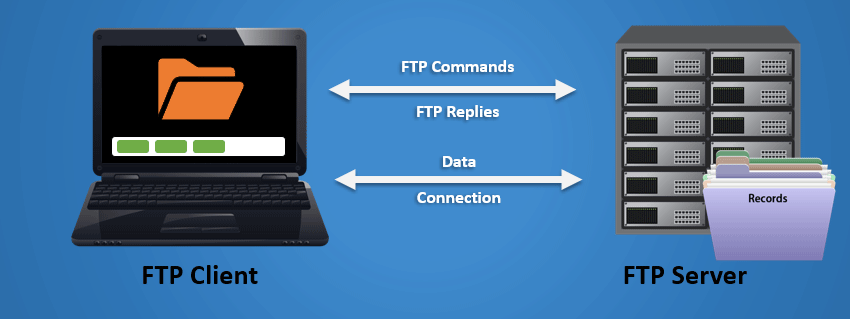
File Transfer Protocol (FTP) is a standard network protocol designed for the efficient transfer of files between a client and a server on a TCP-based network, such as the internet. Operating on the application layer of the OSI model, File Transfer Protocol enables users to upload and download files, manage directories, and perform various file operations. It employs a client-server model, where the client initiates a connection with the server for file transfers. File Transfer Protocol supports both active and passive modes for data connections, and users can authenticate with a username and password or anonymously.

While File Transfer Protocol is widely used for tasks like website maintenance and file sharing, its lack of encryption makes it susceptible to security risks. Secure alternatives like File Transfer Protocol (FTP Secure) and SFTP (SSH File Transfer Protocol) have emerged to address these concerns, providing encrypted data transmission for improved security. Despite these alternatives, File Transfer Protocol remains relevant in certain use cases due to its simplicity and widespread support.
Here are key aspects of FTP:
Client-Server Model:
FTP Server: The server hosts the files and accepts connections from File Transfer Protocol clients. It is responsible for managing access, directories, and file operations.
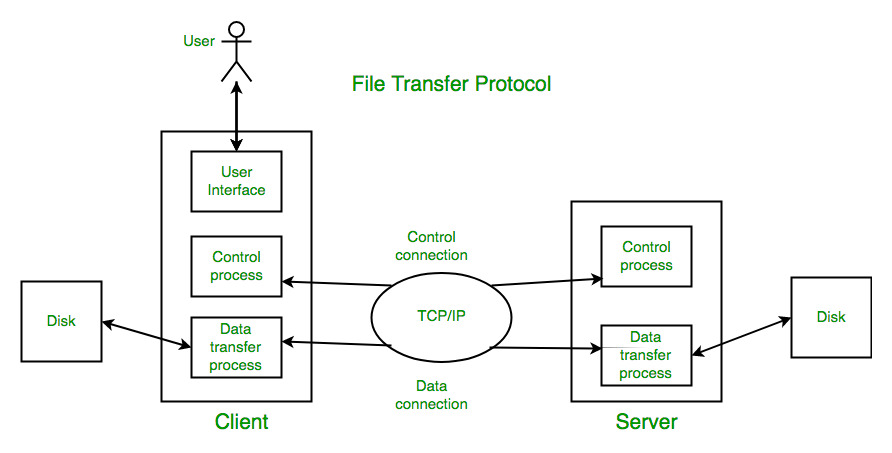
FTP Client: The client is a software application or a command-line tool that connects to the File Transfer Protocol server to perform file transfer operations.
Connection Modes:
Active Mode: The client opens a random port for data transfer, and the server connects to that port. This can be problematic if the client is behind a firewall.
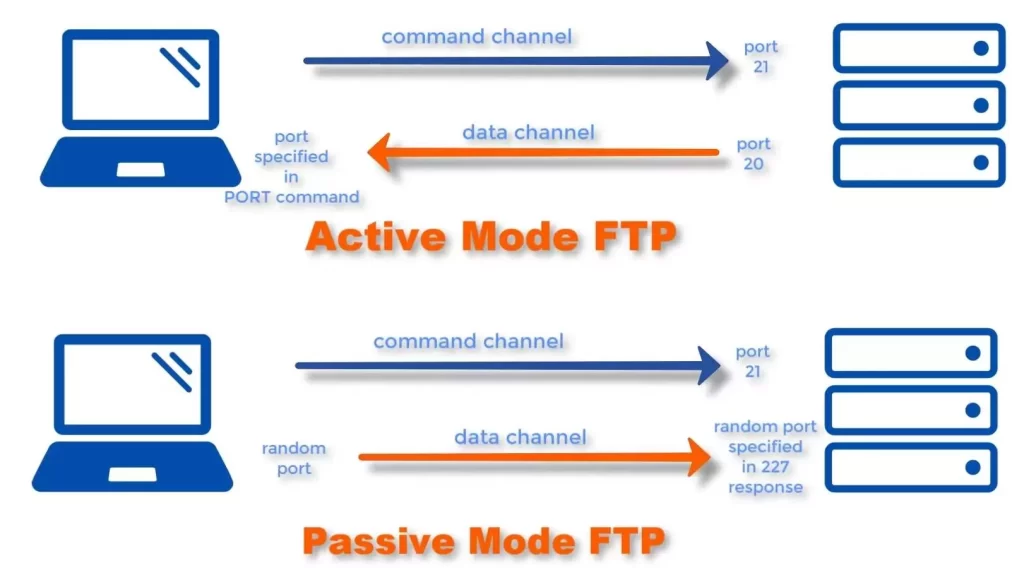
Passive Mode: The server opens a random port for data transfer, and the client connects to that port. Passive mode is often used to overcome firewall-related issues.
Authentication:
File Transfer Protocol supports various authentication methods, including:
Anonymous FTP: Allows users to log in with a generic username (usually “anonymous” or “ftp”) and provide an email address as the password.
Username and Password: Users provide a valid username and password for access to specific directories.
Operations:
FTP supports various operations, including:
Upload (put): Transferring files from the client to the server.
Download (get): Transferring files from the server to the client.
Delete: Removing files on the server.
Rename: Changing the name of a file on the server.
List: Retrieving a list of files and directories on the server.
Security:
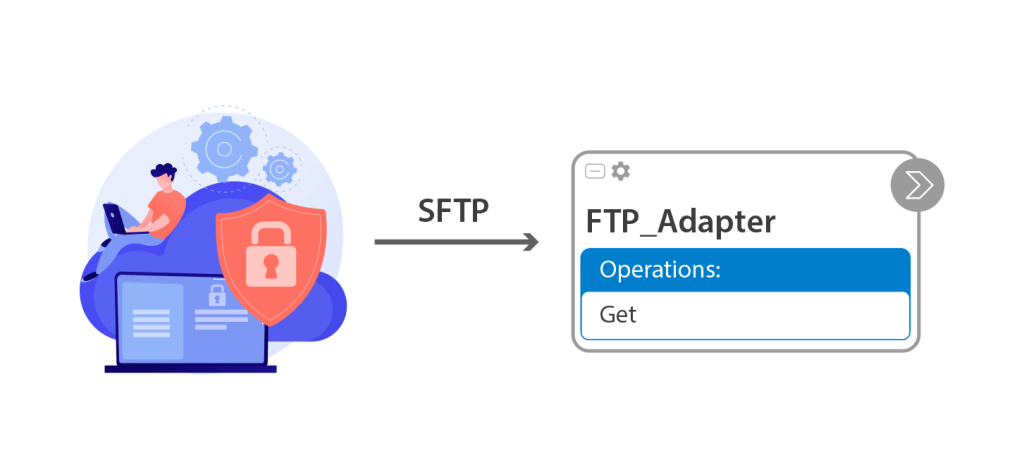
File Transfer Protocol transmits data in plain text, making it vulnerable to eavesdropping. To enhance security, FTP can be secured using:
FTP over SSL (FTPS): Encrypts the control and data connections.

SSH File Transfer Protocol (SFTP): Runs over an encrypted SSH session.
Use Cases:
File Transfer Protocol (FTP) is employed in various use cases across different industries and scenarios:
- Website Management:
- FTP is extensively used for uploading, downloading, and managing files on web servers. Web developers and administrators often use File Transfer Protocol to transfer HTML files, images, scripts, and other content between their local machines and the web server, facilitating website updates and maintenance.
- File Sharing:
- Within local networks or over the internet, File Transfer Protocol enables efficient file sharing. Users can exchange documents, multimedia files, and other data by connecting to FTP servers. It provides a straightforward method for collaborating on projects or sharing resources securely.
- Software Distribution:
- Developers and software distributors utilize File Transfer Protocol to distribute software packages, updates, and patches. This use case is common in open-source communities, where users can download the latest versions of software applications from File Transfer Protocol servers.
- Backup and Recovery:
- File Transfer Protocol is employed in backup strategies for transferring files to remote servers or cloud storage. Regular backups can be scheduled to ensure data integrity and facilitate disaster recovery efforts in case of system failures or data loss.
- Content Publishing:
- Content creators and publishers use File Transfer Protocol to upload media files, documents, and other content to servers. This is especially relevant in the media and publishing industries where large files need to be transferred efficiently for broadcast, publication, or distribution purposes.
- Automated Processes:
- FTP is integrated into automated processes and workflows. For example, it can be used to transfer files between systems as part of a batch job or scripted process, enabling seamless data exchange between different applications.
- Remote File Access:
- Users can access and download files remotely from File Transfer Protocol servers, making it a convenient solution for retrieving files from a distance. This is particularly useful for individuals who need to access work-related documents or personal files stored on a remote server.
- IoT Device Communication:
- In the context of the Internet of Things (IoT), File Transfer Protocol may be used for transferring data between IoT devices and central servers. It facilitates the exchange of sensor data, logs, and updates in IoT ecosystems.
While File Transfer Protocol remains widely used, it’s important to note that security concerns have led to the adoption of more secure alternatives such as File Transfer Protocol (FTP Secure) and SFTP (SSH File Transfer Protocol) in scenarios where encrypted data transmission is crucial.
While FTP has been widely used, more secure alternatives like SFTP and FTPS have become popular to address the security concerns associated with transmitting sensitive data over File Transfer Protocol . Additionally, modern protocols like HTTP and HTTPS are often preferred for transferring files due to their compatibility with web browsers and better security features.