
Managing system services on Plesk servers is an essential aspect of server administration, ensuring the smooth functioning and optimal performance of various components. Through the intuitive Plesk interface, users gain convenient access to service management tools, enabling them to start, stop, or restart services with just a few clicks. This graphical approach simplifies the process, particularly for users less familiar with command-line interfaces. However, for those preferring a more hands-on approach, the command line provides a powerful alternative.
By utilizing commands like systemctl, administrators can efficiently control services, troubleshoot issues, and automate tasks, enhancing the server’s efficiency and reliability. Whether through Plesk’s user-friendly interface or the flexibility of the command line, mastering service management is key to maintaining a stable and secure Plesk server environment.
Here’s how you can start, stop, or restart system services on a Plesk server
Log in to Plesk:
Access your Plesk control panel by navigating to the URL provided by your hosting provider and logging in with your username and password.

Navigate to Services Management:
Once logged in, go to the “Tools & Settings” option.
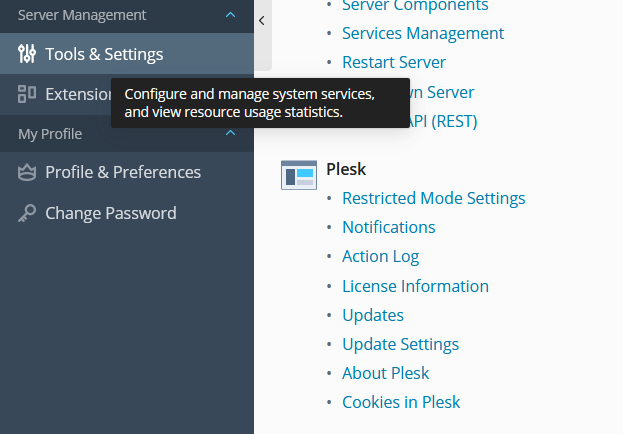
Access Service Management:
Under the “Server Management” section, click on “Services Management”.
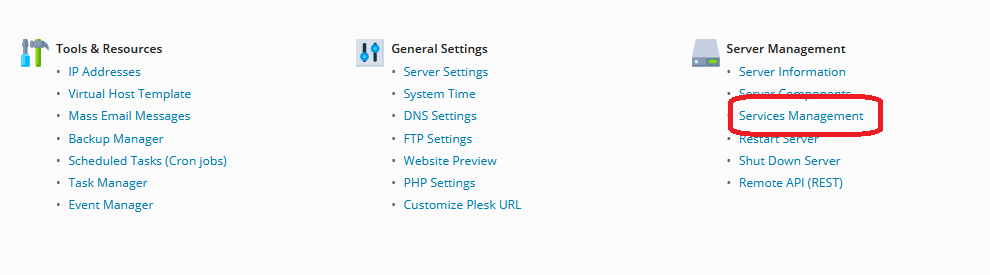
Managing System Services on Plesk:
Here, you’ll see a list of all services running on your server. You can start, stop, or restart any service by clicking the respective buttons next to each service.
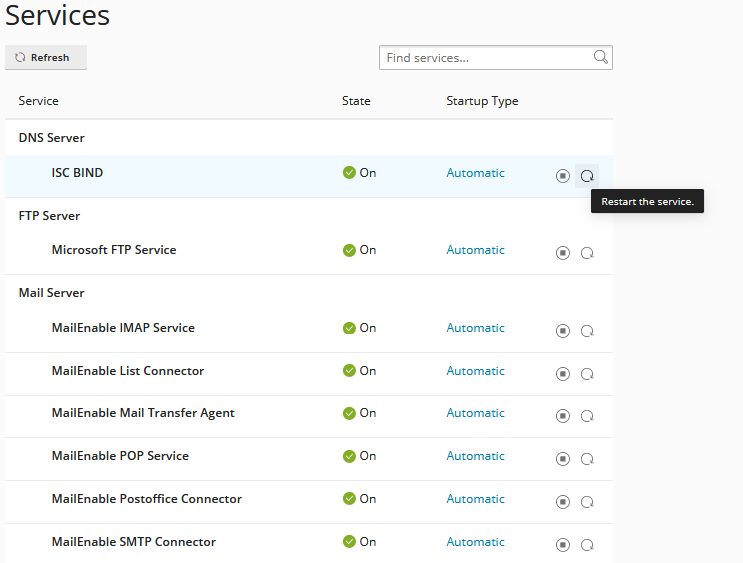
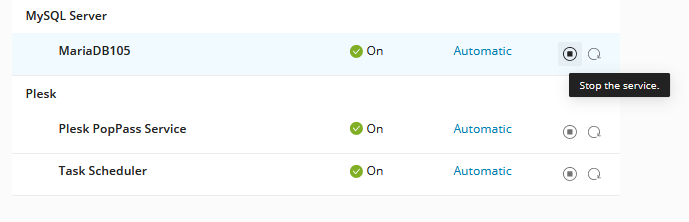
Commonly Managed Services
Overview of essential services typically managed on Plesk servers (e.g., web server, database server, mail server).
Specific instructions for Managing System Services on Plesk Servers popular services like Apache, Nginx, MySQL, and others through both Plesk and CLI.
The Services Management option in Plesk offers several advantages for server administrators:
User-Friendly Interface: Plesk provides an intuitive graphical interface for Managing System Services on Plesk Servers, making it accessible even to users without extensive technical expertise. This user-friendly approach streamlines the process of starting, stopping, or restarting services, reducing the learning curve for administrators.
Centralized Control: Managing System Services on Plesk Servers, administrators can centrally control and monitor all system services from a single location. This centralized approach simplifies service management tasks, eliminating the need to navigate through multiple menus or interfaces.
Real-Time Status Updates: Plesk provides real-time status updates for each service, allowing administrators to quickly identify any issues or abnormalities. By monitoring service status within Plesk, administrators can promptly address issues and ensure continuous server availability.
Automation and Scheduling: Managing System Services on Plesk Servers offers automation and scheduling capabilities for service management tasks. Administrators can automate routine tasks such as service restarts or perform them on a scheduled basis, improving efficiency and reducing manual intervention.
Integration with Plesk Extensions: Plesk’s Services Management integrates seamlessly with third-party extensions and plugins, providing additional functionality and customization options. Administrators can extend the capabilities of Managing System Services on Plesk Servers through the use of extensions tailored to their specific needs.
Role-Based Access Control: Plesk offers role-based access control (RBAC), allowing administrators to assign granular permissions for service management tasks. This enables organizations to delegate responsibilities effectively and restrict access to sensitive server functions as needed.
Managing System Services on Plesk Servers is a pivotal tool for administrators tasked with overseeing the functionality and performance of system services on their servers. Through this feature, Plesk offers a centralized and user-friendly interface, empowering administrators to efficiently control, monitor, and troubleshoot various services critical to server operation. From web servers like Apache and Nginx to database servers such as MySQL and PostgreSQL, Managing System Services on Plesk Servers provides real-time insights into the status of each service, allowing for prompt action in the event of issues or downtime.
Moreover, Plesk’s integration with third-party extensions further enhances its capabilities, offering administrators the flexibility to customize and extend service management functionalities to suit their specific needs. With its intuitive interface, comprehensive monitoring tools, and seamless integration, the Services Management option in Plesk facilitates streamlined server administration, ultimately contributing to enhanced server stability, performance, and overall user experience.